Evaisve
The true instructions of the program are hidden; find a way to locate them and get the flag. Note that there is a fake flag. True flag starts with ####{}
At first glance, with a difficulty rating of 3.0, I was expecting some intense anti-debugging tricks or heavy obfuscation. But, it turns out to be a clean two-part puzzle: a packed resource payload followed by a decoy execution trap.
Triage
Dropping the initial binary into Detect It Easy (DIE) immediately flagged something interesting in the .rsrc section:

DIE shows high entropy in Section 4 (.rsrc). This tells us the outer executable is essentially a dropper holding the real payload inside its resource table.
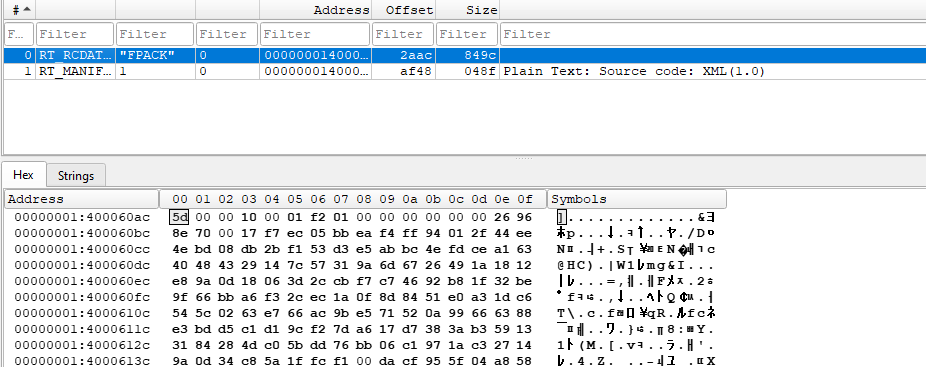
We see two resource types:
RT_MANIFESTRT_RCDATA(named"FPACK")
Every PE file can carry a resource section (.rsrc), but Windows treats different resource types in very different ways:
RT_MANIFEST (Type 24) - The OS Loader Manual
Instruction manual for the Windows OS Loader. Before Windows even executes the first line of code in AddressOfEntryPoint, the OS kernel parses this XML file to set up the rules and execution environment for the program.
The manifest dictates:
- UAC / Privilege Levels: Tells Windows whether the binary requires Administrator elevation (
requireAdministrator) or standard user rights (asInvoker). - Modern UI Themes (Common Controls v6): Without this assembly dependency, UI controls look like boxy Windows 95/2000 grey rectangles.
- DPI Scaling: crisp rendering on high-res displays.
- OS Version Compatibility: Contains GUIDs for supported Windows versions that the binary can run in. If a binary is compiled without this, Windows won't know which environment it was intended for and defaults to Windows 8.0.
RT_RCDATA (Type 10) - Raw Application Data
While Windows has built-in APIs to load and display standard resources like icons (RT_ICON), menus (RT_MENU), and dialogs (RT_DIALOG), RT_RCDATA is completely arbitrary raw user data.
The Windows OS loader doesn't know or care what is inside RT_RCDATA. Therefore it cannot execute it natively. It consists of purely unstructured bytes (archives, config files, shellcode, or compressed executables) meant for the binary’s own code to read, extract, and handle at runtime.
Payload
5D 00 00 10 00 01 F2 01 00 ...
The 5D 00 00 magic bytes point to: LZMA compression.
I dumped the raw "FPACK" resource from DIE to disk and decompressed it using 7-Zip. Out popped our real target: an uncompressed 64-bit PE executable.
Decoy Flag Trap
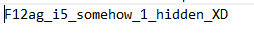
Now that we have the real payload, when I run it, the program creates a file named flag.txt, and exits cleanly. Opening flag.txt gives us the decoy flag - how do i know it is a decoy? - does not match the authors flag syntax:
Main func
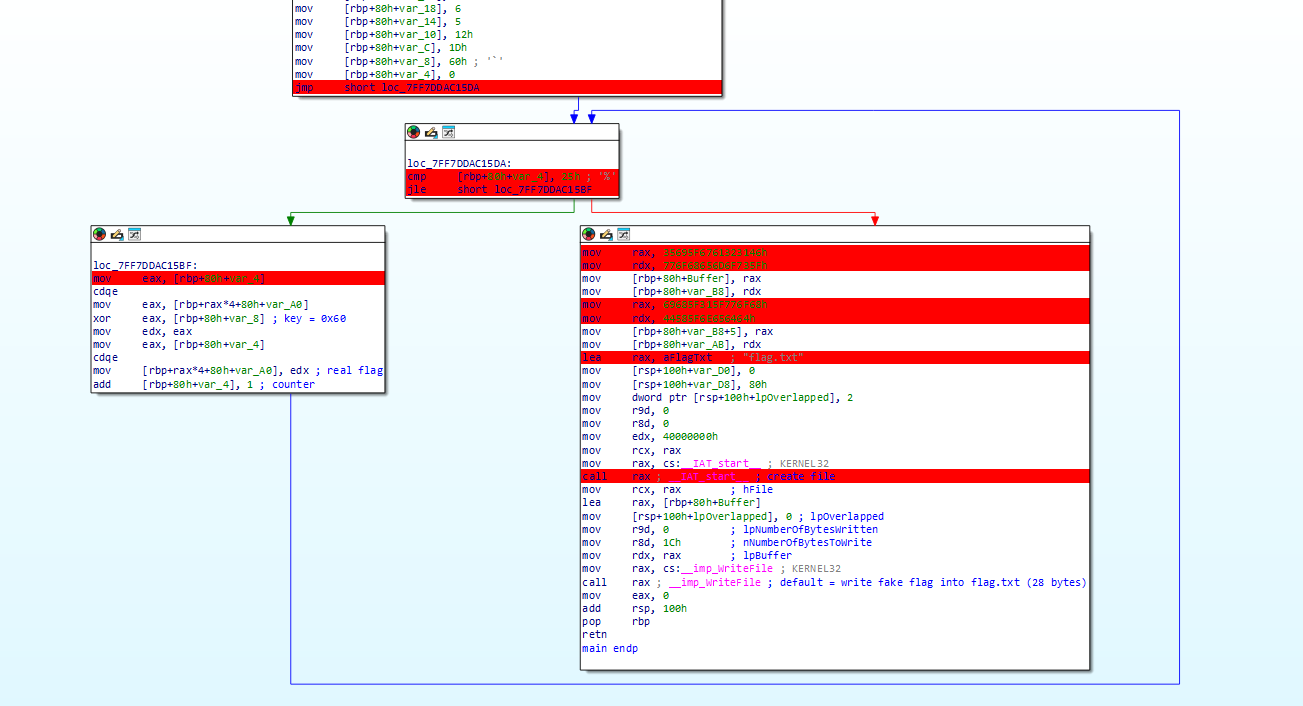
Looking at main, the program control flow is pretty straightforward:
The function starts by moving 38 double words onto the stack:
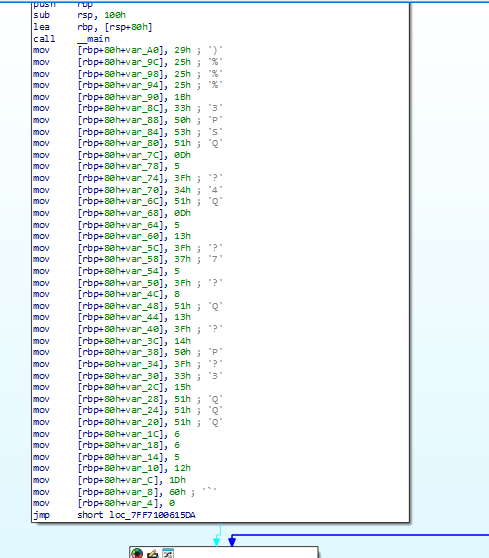
From there, it jumps into the loop condition which decrypts the double words using the key: 0x60. Loop runs 38 iterations.
The Left Block (Real Decryption Loop)
loc_7FF7DDAC15BF:
mov  eax, [rbp+80h+var_4]
cdqe
mov  eax, [rbp+rax*4+80h+var_A0]
xor  eax, [rbp+80h+var_8]          ; XOR with 0x60!
mov  edx, eax
mov  eax, [rbp+80h+var_4]
cdqe
mov  [rbp+rax*4+80h+var_A0], edx   ; Store decrypted character back into var_A0
add  [rbp+80h+var_4], 1            ; Increment loop counter
This loop iterates 38 times, taking each dword from the stack array var_A0, XORing it with 0x60, and writing the decrypted result back into var_A0.
The Right Block (Decoy Write)
Once the counter hits 38 (25h), execution falls through to the right-hand block.
mov  rax, 35695F67616323146h       ; "F1#ag_i5"
mov  rdx, 776F68656D6F735Fh       ; "_somehow"
mov  [rbp+80h+Buffer], rax
mov  [rbp+80h+var_B8], rdx
...
lea  rax, aFlagTxt                 ; "flag.txt"
call CreateFile
...
lea  rax, [rbp+80h+Buffer]         ; Points to the FAKE flag buffer!
mov  r8d, 1Ch                      ; 28 bytes
mov  rdx, rax
call WriteFile                     ; Writes fake flag to flag.txt
retn
The left block spends 38 iterations decrypting the real flag in memory at var_A0. But the right block completely ignores var_A0! Instead, it hardcodes the decoy flag string into Buffer, writes that decoy into flag.txt, and exits. The real flag was decrypted and left sitting in memory all along.
I used two ways to get the plaintext string output:
Python Script
Since we know the 38 stack bytes from the top block and the XOR key is 0x60, we can replicate the loop in a simple Python script:
encrypted_string = [
    0x29, 0x25, 0x25, 0x25, 0x1B, 0x33, 0x50, 0x53, 0x51, 0x0D,
    0x05, 0x3F, 0x34, 0x51, 0x0D, 0x05, 0x13, 0x3F, 0x37, 0x05,
    0x3F, 0x08, 0x51, 0x13, 0x3F, 0x14, 0x50, 0x3F, 0x33, 0x15,
    0x51, 0x51, 0x51, 0x06, 0x06, 0x05, 0x12, 0x1D
]

plaintext = ""
for x in encrypted_string:
    plaintext += chr(0x60 ^ x)

print(plaintext)
Running the script reveals the real flag:

Patching in x64dbg
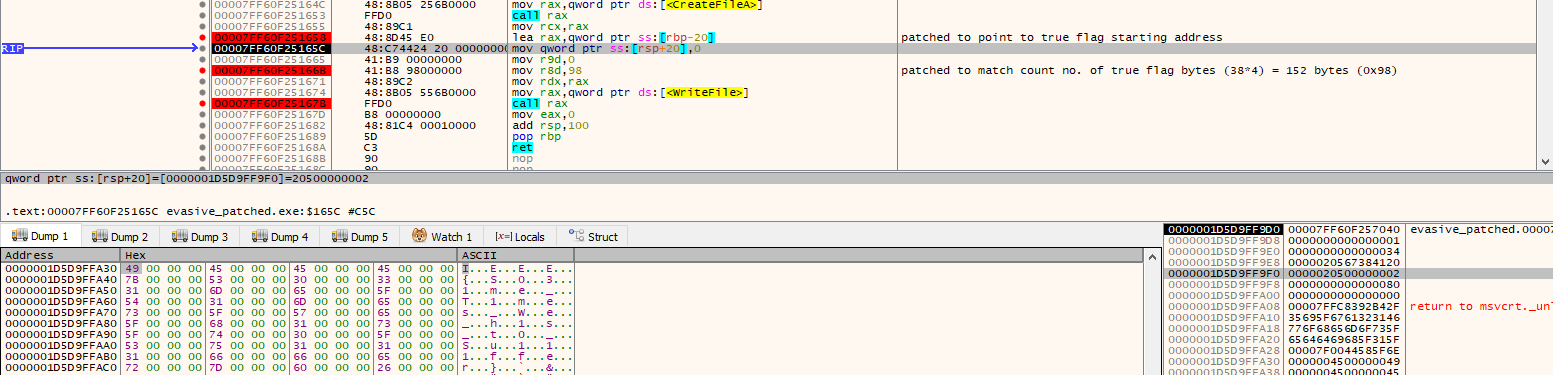
- Patch the buffer pointer:
Changelea rax, [rbp+80h+Buffer]to point to the decrypted stack buffer address start:
lea rax, qword ptr ss:[rbp-20] - Patch the byte count:
Changemov r8d, 1Ch(28 bytes) tomov r8d, 98h(152 bytes) to accommodate the full length of the real flag.
So when WriteFile is called it passes the argument in r8 and rdx which are then written inside flag.txt
Through the x64dbg memory dump for rax we can see the ASCII characters for the real flag -> I . . . E . . . E . . . E . . . {. Executing the patched binary produces the real flag directly inside flag.txt:

Don't let difficulty ratings intimidate you. Good one though.